
Cloudflare can only protect traffic that goes through it. My hosting provider’s temporary domain was a back door that bypassed every rule I set up.
One of my personal websites has found itself on a hit list for a brute force login attack. Once you’re on someone’s list, the best way to get off it is to batten down the hatches and make your site not worth their time. But detecting and tightening up can get challenging, so I wanted to walk you through this particular story as a cautionary tale.
Step 1 – Detection
If you have no systems in place to detect attacks, you’ll never know they’re happening. You can live a happily oblivious life until the attacker takes over your site and the problem can no longer be ignored.
On this site, early detection comes from Wordfence. Its firewall has brute force protection: if someone fails to log in 4 times, that IP is blocked from the site and I receive an email notification.
Step 2 – Reaction (Eventually)
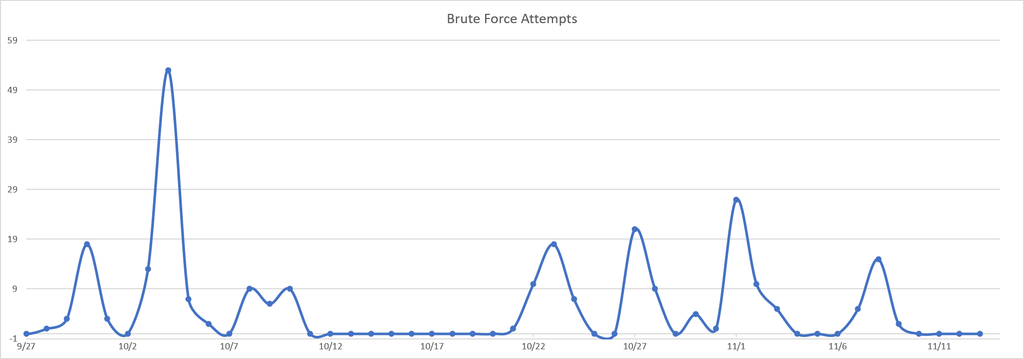
Now that you’re aware of the problem, it’s time to do something about it. As the graph shows, it took me a long time to react. I ignored the first couple of waves because the account the attackers were trying to access didn’t exist on the site. That was a mistake, and I wouldn’t recommend it. Don’t ignore the first signs of an attack.
Step 3 – Deploying Basic Tools
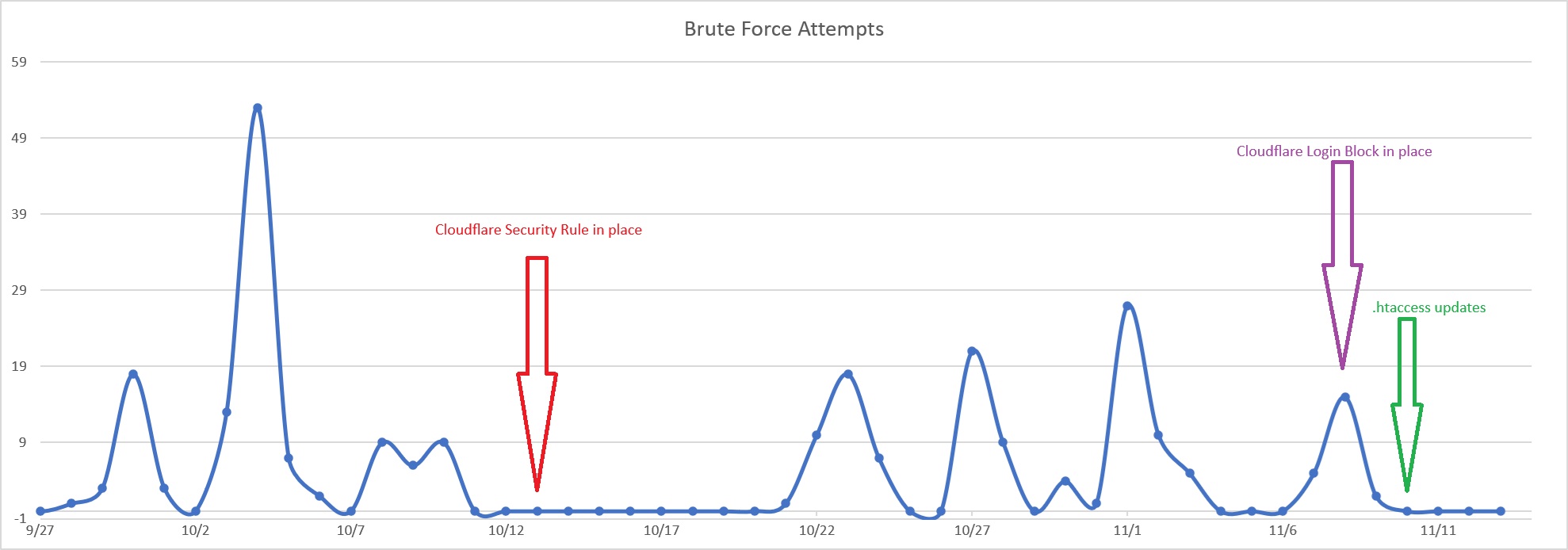
Wordfence showed me which countries the attacks were coming from, so my first line of defense was a Cloudflare security rule to block traffic from outside North America. That rule went into effect on Oct 13 (red line on the graph).
A quick pause to say that Cloudflare is an amazing tool, and its free plan is enough to protect a site of any size from unwanted traffic. I highly recommend it.
The rule gave me about a week of reprieve. Then the attacks started again, followed by another season of complacency on my part. On Nov 8 I added a second rule blocking all login pages for anyone outside North America. It made no visible difference.
Step 4 – Detailed Investigation
After that disappointing result, I went back to the Wordfence logs and took a much closer look. Most of the attacks weren’t coming through my main domain at all. My hosting provider gives every account a temporary domain that points straight at the server, and the attackers were using it. Cloudflare never saw that traffic, so its rules couldn’t touch it. In the most recent three days of logs, roughly 80% of the failed logins came through that temporary domain.
The remaining attempts came through my real domain because my rules didn’t cover everything. They only blocked login pages for visitors outside North America, so attempts from inside North America got through, and they didn’t cover xmlrpc.php at all.
The attacks were also split roughly evenly between two targets: the standard wp-login.php page and xmlrpc.php. XML-RPC is an older WordPress interface that lets an attacker try many passwords in a single request, so even a handful of requests can trigger lockouts.
Step 5 – Deploying the Right Tools
Now that I knew exactly what the attackers were after, I updated my .htaccess file with the correct restrictions: no access through the temporary domain, and no access to xmlrpc.php. I haven’t seen a new attack in 4 days. That doesn’t mean they won’t come back, but I do feel a sense of accomplishment.
A warning before you copy this fix: blocking xmlrpc.php can break Jetpack, some mobile apps, and remote publishing tools. Check what your site depends on first, and test afterward. If you need XML-RPC, Wordfence has an option to disable XML-RPC authentication only, which stops the password guessing and leaves the rest working.
Takeaways
Security tools only protect what goes through them. Check for alternate ways to reach your site: temporary hosting domains, subdomains that point directly at your server, and an exposed origin IP. Any of them can bypass your firewall entirely.
Don’t make it easy to guess your username. What helped on this site was that the admin username wasn’t anything obvious. If yours is “admin” or the name of your business, change it right away. An unusual username isn’t enough on its own, though, because WordPress can expose usernames through author pages and the REST API. Pair it with a strong password and two-factor authentication, and consider Wordfence’s option to block username discovery.
Use good tools, and read their logs. Wordfence and Cloudflare together gave me early warning and a basic layer of protection, and the logs from both let me investigate where the attacks were really coming from.
Act early. These attacks are driven by automated bots, so they won’t get tired or discouraged. Waiting for the attacker to go away isn’t a security strategy, and neither is procrastination.